

Video Segmentation in Computer Vision: A Short Guide [+Examples]
Table of contents
Share blog post



Video segmentation divides videos into meaningful objects and regions over time. Using deep learning, it tracks motion, understands scene context, and powers applications like autonomous driving, AR, and video analysis.

Share blog post
Video Segmentation: How Computers Understand Motion in Video

Here is what you need to know about video segmentation.
- What is video segmentation?
Video segmentation is the process of dividing a video into meaningful regions based on visual cues like color, texture, and motion. Each region represents an object or event that changes over time.
Video segmentation helps computers move beyond raw pixels. It starts with detecting object boundaries, tracking motion, and understanding actions, building a structured view of what’s happening in the scene.
- What are the types of video segmentation?
There are two main types of video segmentation, including Video Object Segmentation (VOS) and Video Semantic Segmentation (VSS). VOS tracks specific moving objects across frames.
In supervised VOS, labeled data or user input is used to mark the target object. In contrast, unsupervised VOS detects and tracks multiple objects automatically using motion, appearance, and optical flow cues.
VSS, on the other hand, labels every pixel in each frame with a class such as road, sky, or vehicle. It focuses on understanding the entire scene rather than a single object, capturing both object details and broader context.
- How is video segmentation done?
Modern video segmentation uses a processing pipeline that analyzes consecutive frames to detect and track objects over time. Earlier methods relied on handcrafted features such as texture, color histograms, and motion cues like optical flow.
Deep learning has since changed the game. CNN- and RNN-based models now extract multi-scale features from each frame and generate adaptive segmentation masks as the video plays. These models learn temporal relationships, allowing them to handle camera motion, occlusion, and appearance changes.
- Why is video segmentation important?
Video segmentation gives computers the ability to understand motion, context, and interaction, not just static images. This deeper perception is essential for interpreting real-world scenes over time.
In autonomous driving, it helps detect pedestrians, lanes, and obstacles for safer navigation. Augmented reality relies on it to separate people or objects from the background so virtual elements blend naturally.
A single frame can capture a moment, but a video tells the story. Videos don't just record visuals. They capture motion, context, and evolving interactions.
This dynamic data is key to computer vision tasks like object segmentation, pattern recognition, and tracking.
In this article, we will cover:
- What is video segmentation in computer vision?
- How video segmentation works
- Active learning and efficient annotation for video segmentation
- Evaluation and benchmarking of video segmentation
- Applications of video segmentation
- Challenges and limitations of video segmentation
- Step-by-step video segmentation workflow (how to get started)
The strength of any video segmentation system comes less from the training itself and more from the quality of the data behind it.
Unsupervised video object segmentation brings added challenges like frame redundancy, temporal consistency, and labeling complexity. This makes the data even harder to manage.
At Lightly, we help teams overcome these hurdles by making data work smarter.
- LightlyTrain supports self-supervised pretraining on unlabeled videos. It helps models learn motion structure, texture features, and visual attention before fine-tuning on labeled samples.
- LightlyStudio enables efficient video dataset curation, annotation, and active learning to uncover edge cases that enhance segmentation.
See Lightly in Action
Curate and label data, fine-tune foundation models — all in one platform.
Book a Demo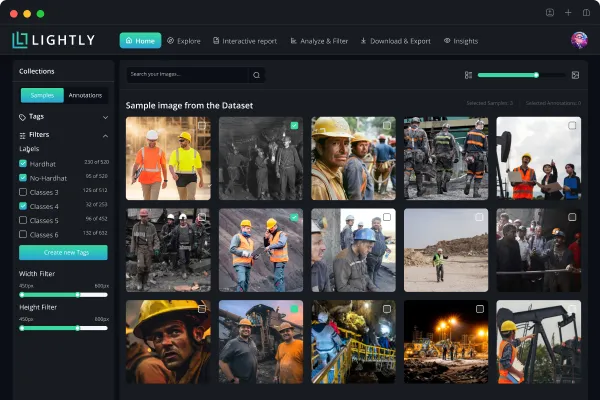
What Is Video Segmentation in Computer Vision?
Video segmentation in computer vision is the process of dividing a video into distinct regions or objects that hold semantic meaning within a scene. Instead of treating a video as a stream of pixels, it breaks it down into segments that represent real objects, actions, or events.
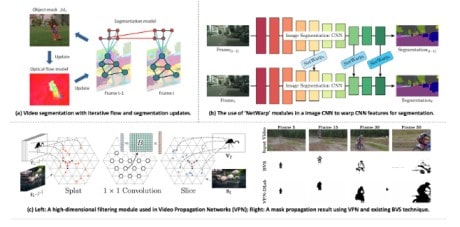
This process involves two main steps:
- Spatial segmentation defines objects and regions within each frame.
- Temporal segmentation preserves each object's boundaries and identity over time, even as they move or change appearance.
The result is a set of segmentation masks that map the location and motion of every object throughout the video.
Types of Video Segmentation
Video segmentation techniques are grouped into two main categories in computer vision. These include Video Object Segmentation (VOS) and Video Semantic Segmentation (VSS).
Both aim to organize visual data for analysis, but differ in focus. Here’s how:
Video Object Segmentation (VOS)
VOS focuses on separating and following specific objects throughout a video. Each frame is analyzed as part of a continuous sequence.
The system identifies the target object, outlines its shape, and tracks it as the scene changes. This remains true even when lighting, scale, or camera angle shifts.

The output includes accurate object boundaries and stable segmentation masks. These form the foundation for higher-level vision tasks such as object recognition, tracking, and scene understanding.
Modes of Video Object Segmentation
Different approaches to VOS depend on how much human input or prior information the system receives. These modes define how the model identifies and tracks objects over time.
Here’s a table summarizing the main modes of VOS:
Video Semantic Segmentation (VSS)
VSS extends image semantic segmentation to video data. It assigns a semantic label to every pixel across all frames. The result is a dense, frame-by-frame understanding of a scene over time.

Unlike static segmentation, VSS must handle change as objects move, deform, and sometimes disappear. Maintaining stable labels under these conditions requires models that combine spatial and temporal information.
💡Pro Tip: Before extending models to videos, it helps to understand pixel level labeling fundamentals covered in our Semantic Segmentation guide.
Video Semantic Segmentation for Aerial Drone Footage (UVid-Net)
Video semantic segmentation isn’t limited to ground-based vision. It’s equally vital for analyzing aerial drone footage. Viewpoint changes, camera motion, and scene dynamics make this task far more complex.
The study UVid-Net introduces a CNN-based encoder–decoder model. It uses temporal encoding and feature refinement to maintain frame-to-frame consistency.
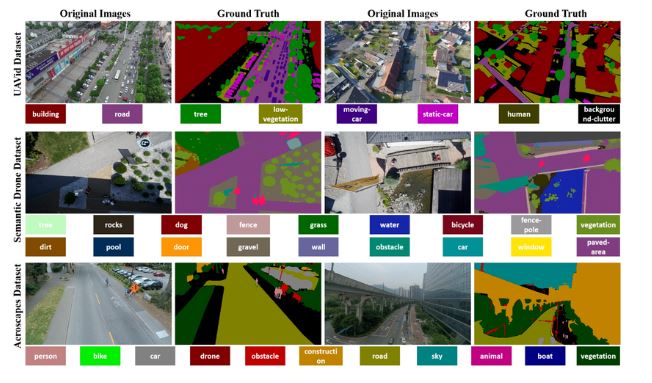
UVid-Net achieves a higher mean IoU (mIoU) than standard per-frame models by using temporal cues and spatial–temporal correlations.
It captures scene dynamics more effectively and delivers more stable segmentation for urban mapping, environmental monitoring, and autonomous aerial navigation.
How Video Segmentation Works
Video segmentation is carried out through a series of linked processes that integrate both spatial knowledge and time reasoning. Let’s take a look at the key steps in the pipeline.
Frame-by-Frame Analysis
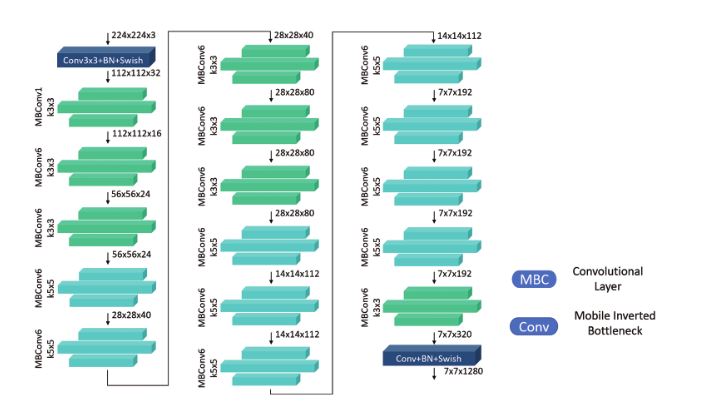
Each frame is treated as a still image, with low- and high-level features extracted to create a detailed representation of the scene.
This is usually done using backbone networks like ResNet or EfficientNet, often including ImageNet-pretrained versions. These networks identify general visual patterns that help the system identify and match objects between successive frames.
💡Pro Tip: When scaling architectures across tasks like video segmentation, our Large Vision Models article shows how capacity and representation learning help models generalize beyond single-frame inputs.
Object Detection and Segmentation Per Frame
After extracting features, the model outlines objects in every frame. The method is task-dependent, e.g., semantic segmentation, instance segmentation, or foreground-background separation.
Semantic Segmentation
A CNN labels each pixel with a class (e.g., car, person, road) in semantic segmentation. Popular architectures include DeepLabv3+, which uses ASPP for multi-scale context, meaning they capture both fine details and larger scene structure.
SegFormer, a transformer-based model, achieves similarly high accuracy while running in real time.

For video tasks, these models run on a frame-by-frame basis or within small temporal windows, producing dense class maps that are then refined.
LightlyStudio automatically curates the most useful and diverse data samples. This helps cut labeling effort while boosting model accuracy.
For semantic segmentation, it reduces redundant frames, improves coverage of rare classes, and builds cleaner, more balanced datasets.
Instance Segmentation
Instance segmentation identifies two or more objects of the same type. It's especially useful in applications like medical imaging, autonomous driving, and video analysis. Popular frameworks include:
- Mask R-CNN builds on Faster R-CNN by adding a parallel branch that predicts a pixel-level mask for each detected object. This allows for simultaneous object detection and segmentation.
- YOLACT accelerates real-time instance segmentation by decoupling detection and mask generation. It produces prototype masks and coefficients in parallel, which allows fast composition of accurate masks.
- Detectron2 is a modular and extensible platform that supports a wide range of segmentation models such as Mask R-CNN, Panoptic FPN, and PointRend. It can be easily integrated into machine learning pipelines or customized for research.
These methods produce per-object masks, which can be traced over time to ensure consistency.
Foreground–Background Separation
For VOS tasks, the focus is on isolating a single primary object from the background. This is done through motion saliency, appearance modeling, or motion clustering techniques.
Two-stream networks often process RGB appearance and optical flow motion in parallel to isolate moving objects. This method is especially useful in video editing, compositing, or surveillance tracking.
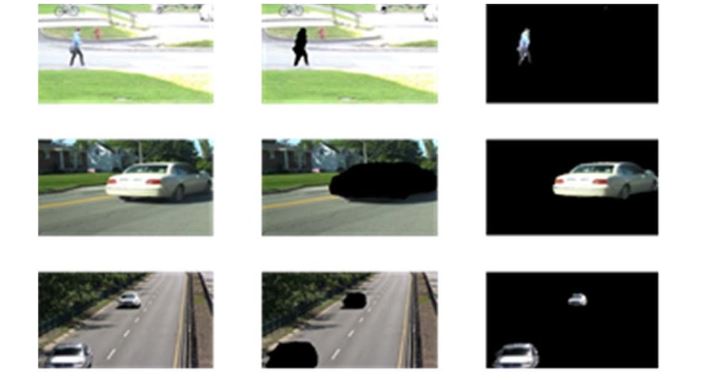
At the end, the model produces candidate masks or segmented regions for each frame. These are often enhanced with temporal cues using 3D convolutions or short-term frame fusion.
Temporal Tracking and Propagation
Temporal tracking and propagation maintain object identities over time by linking frame-level predictions into a coherent video understanding.
Optical Flow
Optical flow estimates pixel motion between frames for temporal alignment. Classical methods like Farneback and modern models such as RAFT generate motion fields that help push segmentation masks forward. This preserves boundaries even during fast movement.
Tracking and Temporal Models
Tracking and temporal models predict object positions and maintain identity through occlusion. Advanced approaches like ConvLSTMs and Temporal Transformers capture frame-to-frame relationships using spatial memory and attention to ensure more stable tracking.
Mask Propagation vs. Re-detection
Two main approaches help maintain the consistency of object masks across video frames.
- Mask propagation carries a segmentation mask forward across frames using optical flow or other motion cues. This approach is computationally efficient and works well when objects move smoothly. However, it can struggle with abrupt movements or large occlusions, where motion estimates become unreliable.
- Redetection addresses these challenges by re-locating the object in each new frame, typically via detection or feature matching. It’s more reliable when the object’s appearance, size, or angle changes. However, it can be more computationally demanding than simple propagation.
Most systems blend both for faster, more consistent video segmentation.
💡Pro Tip: If your workflows involve segmenting objects across frames, our Instance Segmentation article provides the foundation for understanding how per-object mask predictions differ from scene-level segmentation.
Refining and Post-Processing
Refinement comes after the segmentation masks are generated to improve accuracy, sharpen edges, and maintain consistency across frames.
Smoothing and Morphological Operations
Simple techniques like erosion, dilation, and Gaussian blurring remove rough edges and fill small gaps.
Despite their simplicity, these operations are crucial for refining deep learning outputs. They refine object boundaries, reduce noise, and make segmentation masks appear more natural in motion.
Consistency Checks
Frame-to-frame consistency relies on detecting object IDs and class labels. IoU matching, embedding similarity, or Hungarian assignment methods preserve identity continuity, even with partial occlusions.
Temporal Regularization
Temporal regularization ensures smooth and consistent segmentation across frames. Neighboring pixels are connected over time to prevent sudden label changes and maintain visual coherence throughout the sequence.
Multi-Scale Fusion
Combining predictions at multiple scales helps balance global structure with fine details. This approach preserves sharp boundaries. It also captures a broader context, which leads to more accurate and stable segmentation results.
Output Generation
The final step generates segmentation masks for each object or class. These masks can be overlaid on the video, saved as frame sequences, or evaluated using benchmarks like COCO, DAVIS, or YouTube-VOS.
These fine-tuned outputs are deployed in practice to active learning, data curation, and real-time inference pipelines to continuously improve video understanding models.
Common Techniques and Algorithms
Modern video segmentation relies on a mix of advanced algorithms and techniques to deliver accurate, consistent, and real-time scene understanding.
Background Subtraction and Motion-Based Segmentation
Background modeling is simple when the camera remains still. The system either uses a static reference frame or an adaptive model that updates over time.
Pixels that change significantly between frames signal foreground activity, such as a moving object in the scene.
Background models such as Mixture of Gaussians (MOG, MOG2) and K-Nearest Neighbors (KNN) statistically model pixel intensity distributions across time to learn the background.
Foreground activity is then detected as deviations from this learned background model.
This is especially useful in fixed-camera scenarios such as surveillance, traffic monitoring, and industrial inspection.
However, it is less precise when there is camera motion, changing backgrounds, or varying lighting, situations that require more adaptive solutions.
Graph-Based and Region-Based Segmentation
Graph-based segmentation divides a video into coherent segments using a spatiotemporal graph representation. Pixels or superpixels act as nodes, while edges capture appearance similarity, motion correlation, and temporal continuity between frames.
The task involves partitioning this graph optimally into coherent regions. Representative algorithms:
- Graph Cuts minimize an energy function balancing region similarity and boundary strength.
- Random Walker assigns labels probabilistically based on pixel connectivity.
- Conditional Random Fields (CRFs) refine coarse segmentation masks by considering the context of neighboring pixels, smoothing regions, and keeping edges sharp.

Graph-based techniques are also commonly used alongside deep models to enhance spatial accuracy and temporal consistency.
This combination of CNN prediction with refinements of CRFs or graph optimization is still common in several VOS pipelines.
Deep Learning Models (CNNs and RNNs)
Modern video segmentation systems rely on deep neural architectures that jointly learn spatial and temporal features.
- DeepLab / DeepLabv3+ employ atrous (dilated) convolutions and spatial pyramid pooling to balance context capture and boundary precision.
- ConvLSTM fuses convolutional layers with temporal memory units, preserving motion context and object identity over time.

These models achieve fine-grained, temporally coherent segmentation even in dynamic scenes.
Lightly Train enables self-supervised pretraining and distillation to extract strong representations from unlabeled video data.
Distillation transfers knowledge from a large teacher model (e.g., DINOv2 ViT-B/14) to a smaller student network via feature-matching loss (MSE between embeddings).
This produces feature extractors that generalize across domains, enhancing downstream CNN- or RNN-based segmentation with minimal supervision.
Detection and Re-Identification Methods
In detection and re-identification methods, moving objects are tracked and identified across video frames. Models like Mask R-CNN or YOLOv8-Seg are used to detect and segment objects in each frame.
Re-Identification (ReID) networks connect those objects within time by comparing appearance and motion features. This tracking-by-detection approach works best in multi-target scenes, like sports analytics or traffic tracking.
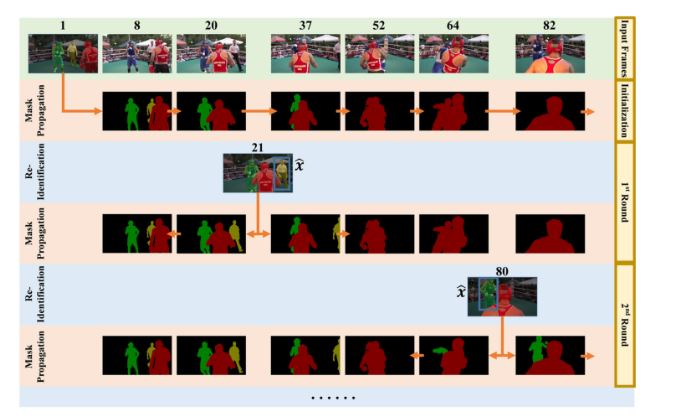
It preserves coherent identities when objects intersect, shift angles, or move in and out of view.
Transformer and Attention Models
Transformers enhance video segmentation by learning long-range spatial and temporal attention. Unlike CNNs, which focus on local receptive fields, transformers use self-attention to connect information across distant frames.
Architectures such as Video Swin Transformer and Sparse Spatiotemporal Transformer (SST) simultaneously combine spatial and temporal information. They increase temporal consistency, lower label flicker, and improve segmentation in occlusion cases.

LightlyTrain implements DINOv2, a self-supervised method optimized for Vision Transformers (ViTs) and large-scale datasets. It combines the teacher–student momentum learning from DINO with masked image modeling from iBOT (Image BERT with Online Tokenizer).
iBOT is a self-supervised method that combines masked image modeling with a teacher–student framework to predict semantic patch tokens rather than raw pixels.
During training, a student ViT aligns its outputs with a momentum-averaged teacher while reconstructing masked patches.
The resulting pretrained ViTs produce highly transferable embeddings for object detection, segmentation, and video analytics. This enhances the quality of spatial-temporal features and reduces dependence on labeled video data.
Foundation Models (e.g., Segment Anything)
Large-scale foundation models have transformed segmentation by enabling instant responses to zero-shot instructions.
The Segment Anything Model (SAM) is an image processing model trained on billions of images. It can dissect any object from a simple input, such as a click, a box, or a prompt, without further training.
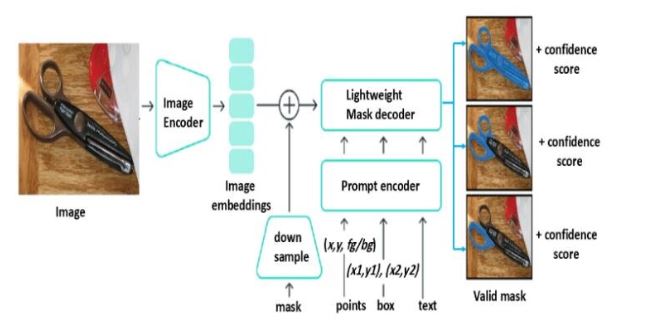
Extended to video, SAM produces frame-level segmentation masks refined with optical flow or temporal propagation for smooth transitions.
LightlyEdge extends this ecosystem by bringing intelligence directly to edge devices. It enables on-device data selection for real-time video analytics.
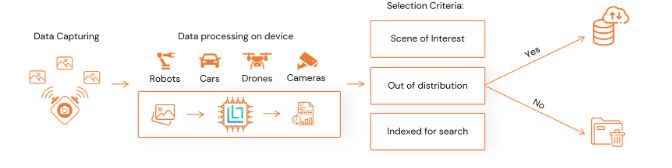
LightlyEdge operates as a compact SDK (< 200 MB footprint) that filters incoming frames on the device itself. It selects only high-value data before upload or storage.
This process significantly reduces bandwidth and annotation cost while improving dataset diversity and representativeness.
Use of Multi-Scale and Hand-Crafted Features
Multi-scale feature extraction helps video segmentation models handle objects of many sizes and motion patterns. It typically uses Feature Pyramid Networks (FPNs) or Atrous Spatial Pyramid Pooling (ASPP) to process frames at several resolutions.
Low-resolution layers capture global context, such as background layout or camera movement. High-resolution layers focus on fine details like object edges and small moving parts.
Models often combine deep learned features with hand-crafted descriptors for stability under lighting or texture changes.
Techniques such as color histograms, Histogram of Oriented Gradients (HOG), and Local Binary Patterns (LBP) preserve appearance when deep features fail under shadows or glare.
Active Learning and Efficient Annotation for Video Segmentation
Improving video segmentation further requires smart data selection and efficient annotation.
The Challenge of Labeled Video Data
Supervised video segmentation relies on pixel-accurate ground-truth masks across multiple consecutive frames. Each frame requires precise object boundaries and temporal consistency, making manual annotation slow and expensive.
Even a short 30-second video can generate thousands of frames. This makes dataset preparation one of the most resource-intensive stages of model development.
Modern data-centric pipelines tackle this challenge by optimizing what gets labeled.
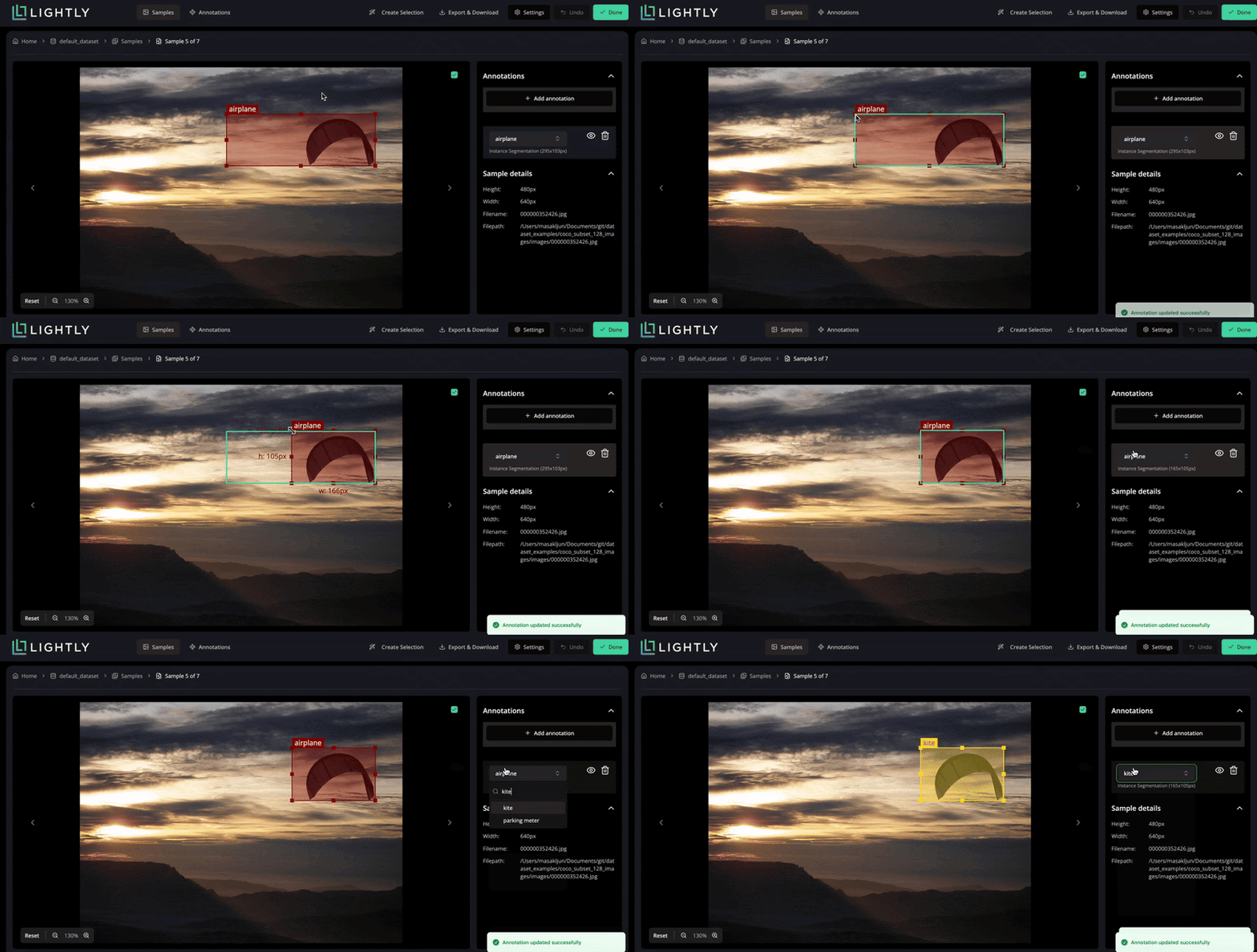
These systems reduce redundant work and maintain high-quality supervision for model training through curated data selection and optimized labeling strategies.
Semi-Automatic Marking Tools
Labeling every frame in a video sequence is often impractical. This is especially true for large-scale video segmentation projects that involve multiple objects and complex object motion.
Modern computer vision annotation systems address this by using semi-automatic methods that combine human input with AI-assisted algorithms. Annotators label only a few key frames, and the system automatically propagates segmentation masks across consecutive frames.
It relies on motion cues such as optical flow to maintain temporal consistency between frames.
Platforms like V7 Labs and CVAT use mask propagation and motion interpolation to estimate object boundaries and track changes in object appearance.
Users can refine pre-generated masks instead of performing full manual annotation. This lowers computational complexity and reduces the need for obtaining labeled data.
These tools use deep learning models that learn texture features, color histograms, and motion features from raw video data. This allows accurate tracking of moving objects across video frames, improving both efficiency and annotation quality.
Active Learning for Video Segmentation
Active learning reduces annotation effort by selecting only the most valuable video frames for labeling. In video segmentation, this prevents redundant work since adjacent frames often share similar content.
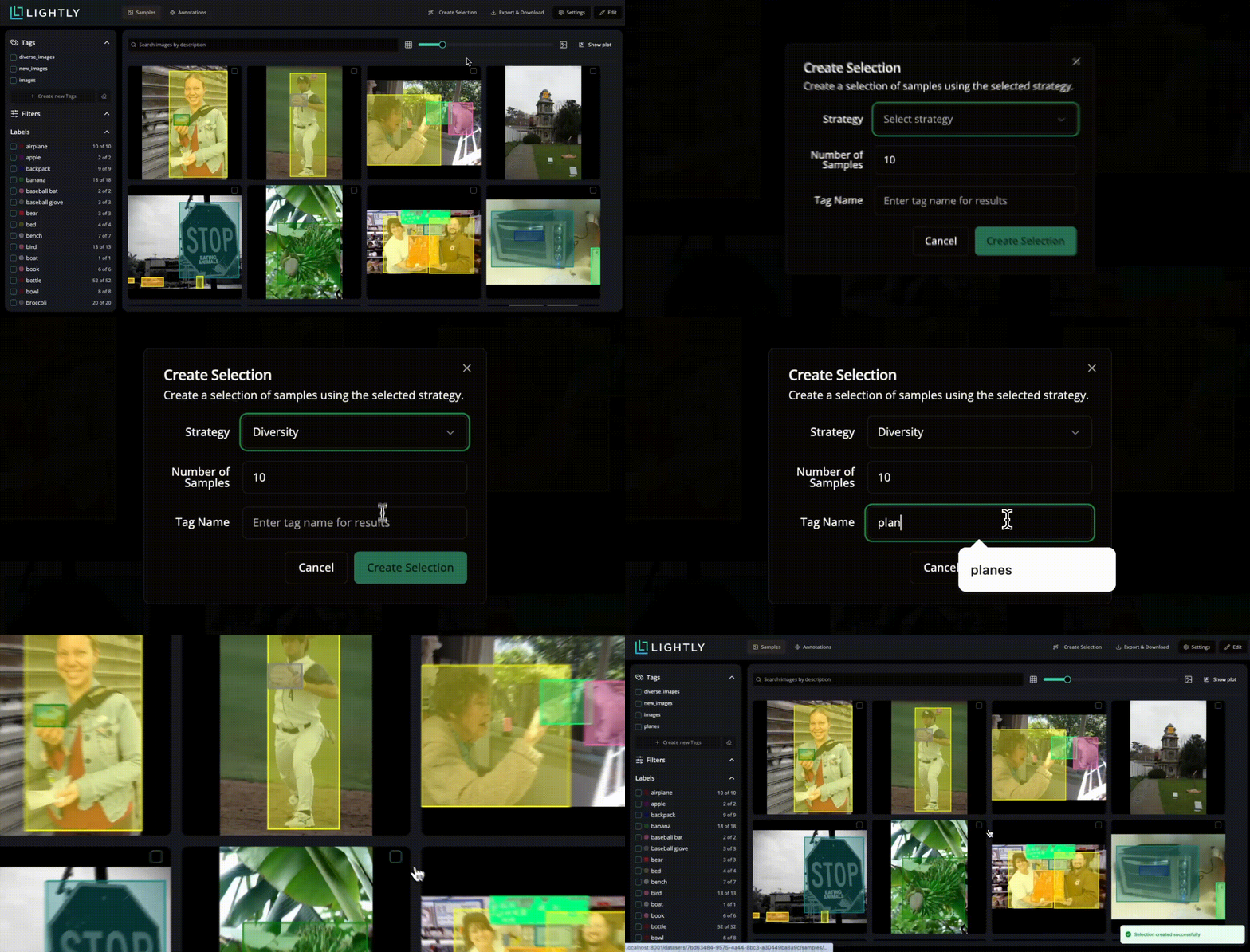
Instead of labeling every instance, the system targets scenes that are new, uncertain, or visually diverse. The Lightly active learning framework applies this idea through three key strategies:
Embedding-based Selection
Each frame is converted into a feature embedding derived from a vision backbone. Frames that are far from existing labeled data in the embedding space are prioritized. This increases diversity in object appearance, motion, and lighting.
Density and Diversity Balancing
Lightly balances frequent and rare samples by combining density-based and diversity-based criteria. This ensures the dataset covers both common motion patterns and complex object segmentation scenarios.
Uncertainty-driven Sampling
Frames with low model confidence or high prediction uncertainty are selected for labeling. Areas affected by motion blur, occlusion, or weak boundaries help improve segmentation masks and temporal consistency.
Interactive Annotation and Human-in-the-Loop Training
Interactive annotation combines human expertise with model feedback to continuously improve segmentation performance. Human reviewers correct labeling errors or uncertain regions, and these adjustments feed back into training to refine future predictions.
Lightly active-learning framework supports human-in-the-loop (HITL) workflows. It shows annotators only the most uncertain or diverse samples.
This selective review lets humans focus on data that meaningfully improves the model, while high-confidence samples are handled automatically.
The setup mirrors interactive video object segmentation (VOS) pipelines, where models request input for complex or ambiguous scenes. Over time, this feedback loop reduces manual effort and increases segmentation accuracy across evolving video data.
Synthetic Data and Augmentation
Creating labeled video datasets at scale remains one of the hardest problems in computer vision. Synthetic data generation offers an effective alternative by automatically generating computer-generated videos where every pixel label is known.
Lightly extends this with integrated workflows for synthetic and prompt-based dataset generation. Teams can generate synthetic data that matches their model’s domain in a unified training pipeline.
The platform also automates the creation of prompts and instructions for both computer vision and multimodal tasks.
Additionally, it employs data augmentation techniques that help models generalize more effectively by introducing controlled variations in color, lighting, motion, and texture.
Transfer Learning and Foundation Models
Transfer learning accelerates video segmentation by adapting pretrained models to new domains with minimal labeled data. Foundation models, such as SAM, provide broad segmentation priors that generalize across diverse visual content and video sequences.
Recent versions of LightlyTrain support advanced semantic segmentation architectures, including EoMT. These models use efficient transformer backbones that deliver faster inference and scalable deployment.
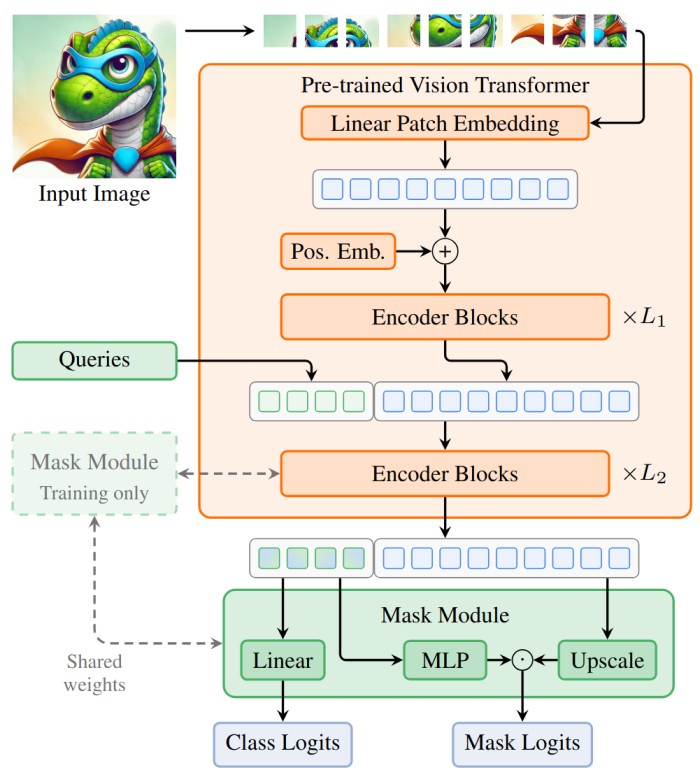
They integrate seamlessly into Lightly’s training workflow to enable domain adaptation with fewer annotations and stronger generalization. Here is the code snippet that you can use to integrate into your workflows easily:
import lightly_train

if __name__ == "__main__":
    # Train a model.
    lightly_train.train_semantic_segmentation(
        out="out/my_experiment",
 model="dinov2/vitl14-eomt",
 data={...},
    )

    # Load the trained model.
    model = lightly_train.load_model_from_checkpoint(
        "out/my_experiment/checkpoints/last.ckpt"
    )

    # Run inference.
    masks = model.predict("path/to/image.jpg")
Foundation models combined with Lightly’s data-centric training help achieve high segmentation accuracy across industrial, robotic, and autonomous systems. This approach also keeps annotation effort and cost low while maintaining model quality.
Evaluation and Benchmarking of Video Segmentation
Proper assessment is essential to quantify actual improvements in video segmentation. Standardized benchmark datasets and evaluation metrics allow fair comparison of models. Here are a few of them:
DAVIS (Densely Annotated Video Segmentation)
DAVIS, a depth-based dataset on VOS, offers short, high-resolution sequences with pixel-level annotations of one or more moving objects. It has single-object (DAVIS, 2016) and multi-object (DAVIS, 2017) variants.

All videos are annotated at 480p. This allows detailed evaluation of temporal consistency, object boundary sharpness, and occlusion recovery.
YouTube-VOS
YouTube-VOS is a semisupervised VOS dataset with a large and varied amount of data. It contains more than 4,000 videos with over 90 types of objects.
The dataset spans natural scenes, sports, and everyday human activities. This makes it a strong benchmark for testing how well models generalize across domains.
Cityscapes-VID and VIPER
Cityscapes-VID and VIPER extend the original Cityscapes dataset into the video domain. They capture urban driving scenes with pixel-level semantic labels across consecutive frames.
They are central in testing Video Semantic Segmentation (VSS) in real camera motion, change of light, or changing scenes.
VIPER, built using the GTA V engine, goes even further. It provides dense annotations for every frame. It also includes ground-truth depth and flow data, giving models richer supervision for multimodal training.
KITTI-STEP and MOTS (Multi-Object Tracking and Segmentation)
KITTI-STEP (Scene Understanding Tracking and Segmentation) and MOTS (Multi-Object Tracking and Segmentation) focus on instance segmentation and object tracking, assigning a persistent ID to each object across frames.
This setup lets researchers evaluate detection, segmentation, and tracking together using metrics like sMOTSA (soft Multi-Object Tracking and Segmentation Accuracy) and MOTSP (precision).
These datasets are particularly applicable to autonomous driving and robotic perception, where spatial and temporal consistency is vital.
Evaluation Metrics
Once we have results, we can evaluate the performance using these metrics:
Applications of Video Segmentation
Advances in video segmentation now support a wide range of real-world uses, from intelligent automation to visual content analysis. Here are some of the key applications:
Autonomous Vehicles
Semantic segmentation enables autonomous vehicles to interpret their surroundings by classifying each pixel as road, vehicle, pedestrian, or obstacle.
This pixel-level understanding supports object detection and safe path planning. Models like DeepLab and PSPNet achieve high accuracy but remain computationally heavy for real-time embedded systems.
To address this, Fast-SCNN presents a two-branch lightweight architecture that is both speedy and efficient. It applies a learning-to-downsample module to quickly extract low-level spatial features and a global feature extractor to represent more general contextual cues.

Collectively, these elements enable high-resolution video frames to be sliced at more than 60 FPS. This ensures temporal consistency and visual accuracy.
This renders Fast-SCNN a viable option for real-time perception systems in self-driving platforms.
Surveillance Systems
Video segmentation powers smart surveillance by detecting and tracking people, vehicles, and objects in real time. Traditional motion-based methods like frame differencing or background subtraction often break down in low light, with camera shake, or when scenes get crowded.
Deep learning–based segmentation overcomes these limits by learning spatial–temporal features directly from video data.
One notable study is the Human Segmentation in Surveillance Video with Deep Convolutional Networks. The authors introduced an encoder–decoder CNN specifically designed for low-resolution, noisy surveillance footage.
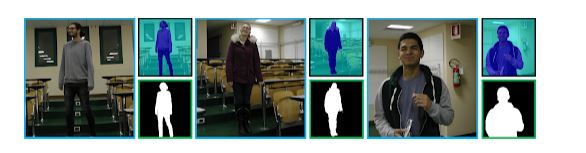
It effectively learns hierarchical shape and motion representations to recognize human figures against complex backgrounds, even in low-light and occlusion conditions.
This notably boosts detection and tracking accuracy in CCTV applications such as crowd monitoring, intrusion detection, and activity analysis.
Sports Analytics
Computer vision in modern sports analysis is transforming game footage into quantifiable insights. Earlier tracking methods relied on motion-based heuristics. These often failed when players overlapped. They also broke down whenever the broadcast camera moved.
A recent advancement, DeepSportLab, introduces a unified deep-learning framework. This framework performs ball detection, player instance segmentation, and pose estimation in team sports scenes.

Instead of relying on multiple independent models, it uses a single network to handle all tasks simultaneously. The method combines part intensity fields to locate players, joints, and the ball.
It also employs spatial embeddings that group pixels and joints into individual player instances.
This end-to-end design effectively manages occlusion, motion blur, and overlapping players, maintaining both accuracy and efficiency.
Video Editing
Video segmentation unlocks editing precision that once required controlled studio setups. It enables editors to isolate subjects, replace backgrounds, remove objects, or adjust colors selectively, all directly from raw footage, without a green screen.
A key breakthrough, Background Matting introduces a trimap-free method to extract high-quality foreground and alpha mattes of people in everyday environments. The user captures two images or videos, one with the subject and one of the same scenes without the subject.
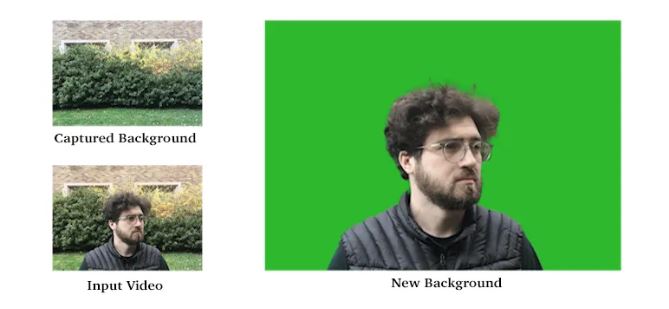
A deep network takes the input image, the background shot, and a soft person segmentation. Next, it predicts both the foreground colors and the alpha matte.
This approach removes the need for green screens or hand-drawn trimaps while still producing clean mattes suitable for realistic compositing onto new backgrounds. The method works best for human subjects in front of a mostly static background with limited camera motion.
Step-by-Step Video Segmentation Workflow (How to Get Started)
Once the methods are understood, the next step is to implement an effective video segmentation pipeline.
Define the Task and Gather Requirements
Every successful computer vision project begins with a clearly defined goal. Before choosing models or writing code, you need to know what type of segmentation is required, the level of precision needed, and the data and resources available.
There are two major directions in video segmentation:
- Object-centric segmentation focuses on one or more target objects, such as a person, car, or animal, and tracks them across frames
- Scene or semantic segmentation labels every pixel in the image with a class (sky, road, building, etc.)
Our goal is object-centric video segmentation for this tutorial. Since this is a learning-oriented project, we prioritize accuracy and clarity over real-time performance.
To simplify the workflow, we’ll use an open, annotated dataset (DAVIS) rather than creating manual labels. Each DAVIS sequence is short (around 80 frames) and moderate in resolution (~480 × 854 pixels). This makes it ideal for demonstration in Colab.
Data Preparation and Annotation
Instead of recording our own videos, we choose to use DAVIS 2017. This is a public dataset created specifically for video object segmentation. We also avoid manual annotation by relying on the dataset’s pre-labeled frames.
Each sequence in DAVIS consists of a short video and densely annotated, per-frame segmentation masks for the main object.
Loading DAVIS
Now let’s look at the concrete code:
import tensorflow_datasets as tfds

# This will download DAVIS 2017 (might take a few minutes the first time)
davis_builder = tfds.builder("davis")
davis_builder.download_and_prepare()

ds_train = davis_builder.as_dataset(split="train", shuffle_files=False)

ds_train
Explanation
tfds.builder("davis")creates a dataset builder that knows how to manage DAVIS data.download_and_prepare()automatically downloads, extracts, and preprocesses the dataset.as_dataset(split="train")converts it into a TensorFlow dataset ready for iteration.- Each element in
ds_traincontains a video (frames) and its segmentation masks (segmentations).
This setup gives us clean, annotated video data, the foundation for training or testing a segmentation model in the next steps.
Choose a Model / Method
With the dataset prepared and verified, the next step in our workflow is to choose how we’ll perform video segmentation.
We’ll use a pre-trained model, Segment Anything (SAM). Next, we can generate segmentation masks for any object in an image using a simple input prompt, in this case, a bounding box from a mask.
SAM is ideal for interactive or semi-automated segmentation tasks, which makes it well-suited for educational purposes and prototyping.
Load and Inspect the DAVIS Data
Before running the model, we’ll reload and inspect our DAVIS dataset to ensure the structure is correct.
import tensorflow_datasets as tfds

# Load the dataset (train split)
ds_train = tfds.load("davis", split="train", shuffle_files=False)

# Take one example (one video sequence)
example = next(iter(ds_train))

# Inspect keys (optional, just to see the structure)
print("Top-level keys:", example.keys())
print("Video keys:", example["video"].keys())

# Extract tensors
video_tf = example["video"]["frames"]          # tf.Tensor shape (T, H, W, 3)
masks_tf = example["video"]["segmentations"]   # tf.Tensor shape (T, H, W, 1)

# Convert to numpy
video = video_tf.numpy()
masks = masks_tf.numpy()

print("Video shape:", video.shape)
print("Masks shape:", masks.shape)
Output
Top-level keys: dict_keys(['metadata', 'video'])
Video keys: dict_keys(['frames', 'segmentations'])
Video shape: (80, 480, 854, 3)
Masks shape: (80, 480, 854, 1)
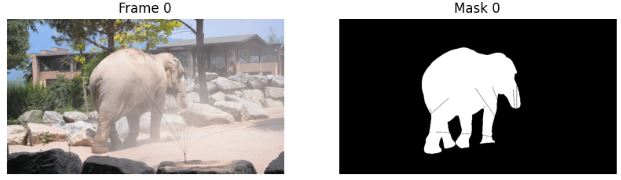
To quickly confirm the data, we can visualize one frame and its corresponding segmentation mask:
import matplotlib.pyplot as plt
import numpy as np

frame0 = video[0]
mask0 = masks[0]
if mask0.ndim == 3:
    mask0 = mask0[..., 0]

plt.figure(figsize=(10,4))
plt.subplot(1,2,1)
plt.title("Frame 0")
plt.imshow(frame0)
plt.axis("off")

plt.subplot(1,2,2)
plt.title("Mask 0")
plt.imshow(mask0, cmap="gray")
plt.axis("off")
plt.show()
Output
This quick visual check confirms that the dataset has loaded correctly. It also ensures that each frame and its mask align properly, which is essential before moving on to inference.
Load the Pre-trained SAM Model
Next, we’ll load the Segment Anything Model (SAM). SAM uses a transformer backbone (ViT) and can segment any object in an image when given a prompt.
For demonstration purposes, we’ll use the ViT-B variant. It is smaller and faster than the ViT-H version, making it ideal for Google Colab.
import os
import torch
from segment_anything import sam_model_registry, SamPredictor

# Download the ViT-B checkpoint (faster and lighter)
ckpt_url = "https://dl.fbaipublicfiles.com/segment_anything/sam_vit_b_01ec64.pth"
ckpt_path = "sam_vit_b_01ec64.pth"

if not os.path.exists(ckpt_path):
    !wget -q {ckpt_url} -O {ckpt_path}

device = "cuda" if torch.cuda.is_available() else "cpu"
print("Using device:", device)

# Load the SAM model and move it to the selected device
sam = sam_model_registry["vit_b"](checkpoint=ckpt_path)
sam.to(device=device)
predictor = SamPredictor(sam)
Video Segmentation Execution (Inference)
After loading the model (our SAM predictor) and preparing the data (video, masks from DAVIS), we run inference across the video frames.
In our case, we use a bounding box prompt derived from a mask. On the first frame, we use the ground-truth mask to compute a bounding box around the main object. On subsequent frames, we use the previous predicted mask to derive the box.
This is a simple way to track the object because each frame’s prediction guides the next frame’s prompt. While the loop runs, we also store an “overlay” image that displays the predicted mask on top of the original frame. This is great for qualitative inspection.
Helper Functions for Bounding Box and Overlay
import cv2
import numpy as np

def bbox_from_mask(mask, padding=10):
    ys, xs = np.where(mask > 0)
    if len(xs) == 0 or len(ys) == 0:
        return None
    x_min, x_max = xs.min(), xs.max()
    y_min, y_max = ys.min(), ys.max()
    x_min = max(x_min - padding, 0)
    y_min = max(y_min - padding, 0)
    x_max = min(x_max + padding, mask.shape[1] - 1)
    y_max = min(y_max + padding, mask.shape[0] - 1)
    return np.array([x_min, y_min, x_max, y_max])

def overlay_mask_on_image(image_bgr, mask, alpha=0.5):
    overlay = np.zeros_like(image_bgr)
    overlay[:, :, 1] = 255  # green
    mask_bool = mask > 0
    out = image_bgr.copy()
    out[mask_bool] = cv2.addWeighted(
        image_bgr[mask_bool],
        1 - alpha,
        overlay[mask_bool],
        alpha,
        0
    )
    return out
Main Inference Loop with SAM
This code performs video object segmentation (VOS) using the Segment Anything Model (SAM). It tracks an object using a bounding-box prompt from the ground-truth mask in the first frame. For all subsequent frames, it uses the predicted mask from the previous frame.
This creates a simple bootstrapped tracking loop to generate a sequence of predicted segmentation masks for the object across the video.
ious = []           # we will fill this later in Step 6
pred_masks = []     # raw predicted masks (one per frame)
overlay_frames = [] # frames with overlay to visualize

T, H, W, _ = video.shape
print("Total frames:", T)

prev_pred_mask = None

for t in range(T):
    print(f"Frame {t}/{T-1}")

    # current frame
    frame_rgb = video[t].astype(np.uint8)   # SAM expects RGB
    frame_bgr = cv2.cvtColor(frame_rgb, cv2.COLOR_RGB2BGR)

    # ground-truth mask for reference
    gt_mask = masks[t]
    if gt_mask.ndim == 3:
        gt_mask = gt_mask[..., 0]
    gt_mask = (gt_mask > 0).astype(np.uint8) * 255

    # set image for SAM
    predictor.set_image(frame_rgb)

    # choose bounding box prompt
    if t == 0:
        # use ground-truth mask on first frame
        bbox = bbox_from_mask(gt_mask)
    else:
        # use previous prediction
        bbox = bbox_from_mask(prev_pred_mask)
        if bbox is None:
            # fallback: use GT if prediction failed
            bbox = bbox_from_mask(gt_mask)

    if bbox is None:
        print("  No bbox found, predicting empty mask.")
        pred_mask = np.zeros_like(gt_mask)
    else:
        boxes = bbox[None, :]
        masks_sam, scores, _ = predictor.predict(
            box=boxes,
            multimask_output=True
        )
        best_idx = np.argmax(scores)
        pred_mask_bool = masks_sam[best_idx]
        pred_mask = (pred_mask_bool.astype(np.uint8) * 255)

    pred_masks.append(pred_mask)
    prev_pred_mask = pred_mask

    # overlay for visualization
    overlay = overlay_mask_on_image(frame_bgr, pred_mask)
    overlay_frames.append(overlay)
Post-processing and Refinement
Raw segmentation masks from a model are often noisy. They may have small holes, jagged edges, or flicker between frames. Post-processing cleans and stabilizes these predictions.
Here, we’ll apply:
- A simple morphological cleanup per frame. This removes small artifacts, closes holes, and smooths object boundaries to produce cleaner, more consistent masks.
- A temporal smoothing pass that averages masks across neighboring frames.
Morphological Cleaning
def clean_mask(mask):
    # Binarize
    _, mask_bin = cv2.threshold(mask, 127, 255, cv2.THRESH_BINARY)

    kernel = np.ones((5, 5), np.uint8)
    # remove small noise and fill small holes
    mask_eroded = cv2.erode(mask_bin, kernel, iterations=1)
    mask_dilated = cv2.dilate(mask_eroded, kernel, iterations=2)
    return mask_dilated

cleaned_pred_masks = [clean_mask(m) for m in pred_masks]
Temporal Smoothing
def temporal_smooth(masks_list, window=2):
    masks_arr = np.stack(masks_list, axis=0)  # (T, H, W)
    T, H, W = masks_arr.shape
    smoothed = []

    for t in range(T):
        start = max(0, t - window)
        end = min(T, t + window + 1)
        avg = np.mean(masks_arr[start:end], axis=0)
        _, mask_bin = cv2.threshold(
            avg.astype(np.uint8), 127, 255, cv2.THRESH_BINARY
        )
        smoothed.append(mask_bin)

    return smoothed

smoothed_pred_masks = temporal_smooth(cleaned_pred_masks, window=2)
After this, smoothed_pred_masks is your refined set of masks, cleaner and more stable across time. You can also rebuild overlay_frames using these if you want a smoother visualization:
overlay_frames = []
for t in range(T):
    frame_rgb = video[t].astype(np.uint8)
    frame_bgr = cv2.cvtColor(frame_rgb, cv2.COLOR_RGB2BGR)
    overlay = overlay_mask_on_image(frame_bgr, smoothed_pred_masks[t])
    overlay_frames.append(overlay)
Evaluation
If you have ground-truth masks (which we do with DAVIS), you can quantitatively evaluate how well your model is performing. A common metric for segmentation is Intersection over Union (IoU). It measures how much the predicted mask overlaps with the ground truth.
We compute IoU for each frame, then examine its evolution over time and the mean IoU across the entire sequence. You can also compare against baselines, like “use the first frame’s mask for all frames” or simple motion-based methods.
IoU function
def iou(pred_mask, gt_mask, thr=127):
    pred_bin = pred_mask > thr
    gt_bin = gt_mask > thr
    inter = np.logical_and(pred_bin, gt_bin).sum()
    union = np.logical_or(pred_bin, gt_bin).sum()
    if union == 0:
        return 1.0 if inter == 0 else 0.0
    return inter / union
Compute IoU Across Frames and Plot
import matplotlib.pyplot as plt
import numpy as np

ious = []
for t in range(T):
    gt_mask = masks[t]
    if gt_mask.ndim == 3:
        gt_mask = gt_mask[..., 0]
    gt_mask = (gt_mask > 0).astype(np.uint8) * 255

    score = iou(smoothed_pred_masks[t], gt_mask)
    ious.append(score)

plt.figure(figsize=(8,4))
plt.plot(ious, marker="o")
plt.xlabel("Frame index")
plt.ylabel("IoU")
plt.title("IoU over time (SAM on DAVIS)")
plt.grid(True)
plt.show()

print("Mean IoU:", np.mean(ious))
Output
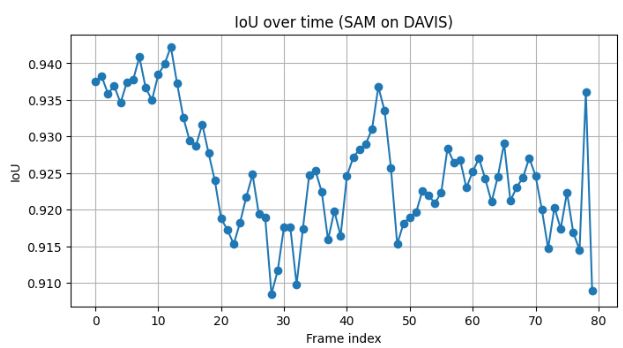
The model maintains strong overall consistency, staying above 0.91 for most frames. The slight dip between frames ~20–40 suggests object drift. SAM’s prompt propagation (using previous mask as input) may have slightly lost track of fine boundaries during motion or occlusion.
The later recovery indicates the tracker re-stabilized once the object reappeared in a clearer context.
This performance (IoU > 0.9) is excellent for an off-the-shelf model without task-specific fine-tuning. It shows that SAM generalizes well to unseen video data.
Iterate or Deploy
After evaluating the segmentation performance, the next step is to decide whether to iterate or deploy the current solution.
Our results show a Mean IoU of = 0.925. It indicates that the SAM performed exceptionally well on the DAVIS dataset without any fine-tuning.
The predictions remained stable throughout the video sequence, with only slight drops during frames where the object motion or occlusion was more complex.
Iteration is about striking the right balance between accuracy, speed, and generalization. Since SAM already offers high performance with minimal setup, even small adjustments can yield excellent practical results.
Maintenance and Continuous Monitoring
Once your segmentation workflow is deployed or integrated into an application, it’s important to maintain its performance over time.
To keep your system reliable:
- Regularly test on new samples and track IoU trends.
- Identify and retrain on failure cases.
- Use feedback or low-confidence frames for re-annotation.
- Optimize inference for scalability and consistency.
Maintenance closes the loop between model performance and real-world data. It ensures long-term reliability of your video segmentation pipeline.
How Lightly AI Enables a Video Segmentation Workflow
Building reliable video segmentation systems depends not only on model architecture but also on the quality and diversity of training data. Real-world video pipelines face challenges such as redundant frames, inconsistent labeling, and the high cost of manual annotation.
Lightly AI addresses these issues through a unified, data-centric platform that streamlines every stage.
Dataset Curation, Annotation & QA in LightlyStudio
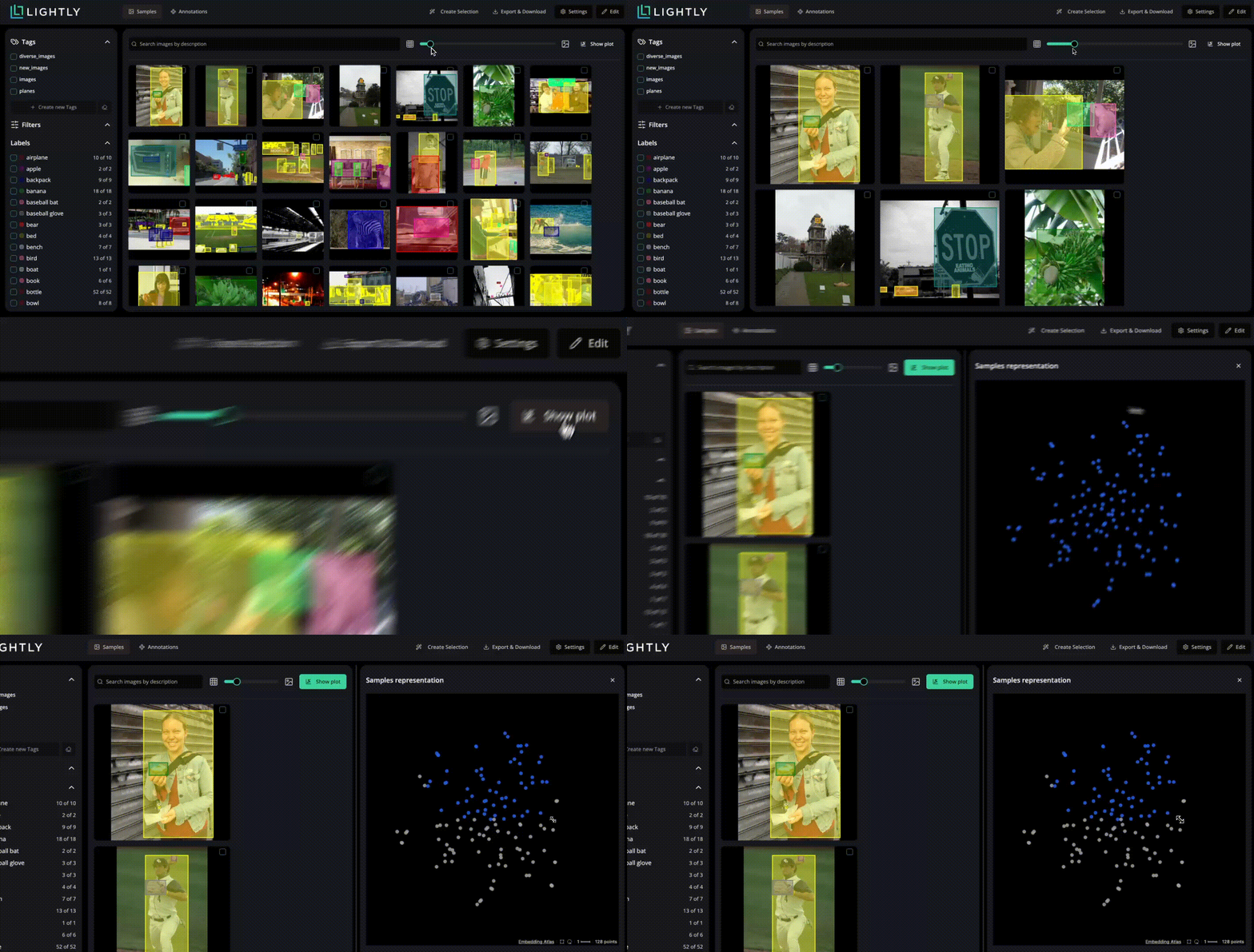
Upload collected video frames (or extracted keyframes) into LightlyStudio for dataset management. Here you can:
- Visualize frame embeddings and clustering to identify under-represented motion, lighting, or object boundary scenarios.
- Annotate segmentation masks or assign classes in built-in tools supporting video, image, and multimodal data.
- Use active learning selection to focus annotation effort on frames that matter most for segmentation performance (e.g., uncommon object motion or occlusion).
Pretraining and Fine-tuning with LightlyTrain
Once curated and labeled, video frames are ready. LightlyTrain enables efficient pre-training and fine-tuning of segmentation models.
Through self-supervised pre-training on unlabeled video data, models learn meaningful representations without requiring labeled samples. Targeted fine-tuning then enables stronger generalization and higher temporal consistency in dynamic scenes.
This reduces reliance on extensive manual labeling and enhances the model’s ability to preserve accurate object boundaries and adapt to motion, lighting, or scene variations.
Conclusion
The evolution of video segmentation now combines advanced architectures with efficient data workflows. From classical motion-based segmentation to modern model approaches, progress depends on how effectively data, models, and human input work together.
These innovations are reshaping how computer vision systems learn, adapt, and perform across real-world video environments.

Stay ahead in computer vision
Get exclusive insights, tips, and updates from the Lightly.ai team.

.png)
.png)