


Lightly vs. SuperAnnotate: Technical Comparison
Table of contents
Share blog post



Lightly and SuperAnnotate are end-to-end CV data platforms with different strengths. Lightly focuses on embedding-based data curation using self-supervised models to cut labeling needs, while SuperAnnotate emphasizes multimodal annotation and enterprise MLOps integration.

Share blog post
Lightly vs. SuperAnnotate: Data Curation Efficiency vs. Annotation-Centric MLOps

- Lightly and SuperAnnotate are both end-to-end platforms for computer vision data management, but they solve different problems within the data pipeline.
- Lightly integrates self-supervised frameworks like DINOv2 and EoMT for embedding-based data curation and achieves up to 14% mIoU gains on ADE20K with 90% fewer labels. Also, support multimodal data annotation.
- SuperAnnotate focuses on multimodal annotation pipelines and orchestration with enterprise-grade MLOps tools like Databricks and Sagemaker.
- This comparison covers their technical capabilities, workflows, scalability, integrations, use cases, and the business impact for ML teams.
Building high-performing models depends on quality training data and efficient pipelines. The choice of data platform can make or break model performance and efficiency.
Two leading platforms, Lightly and SuperAnnotate, provide solutions for computer vision (CV) teams to improve dataset quality and build better AI models faster.
In this article, we will compare Lightly vs SuperAnnotate across features so you can choose the right tool for your needs.
See Lightly in Action
Curate and label data, fine-tune foundation models — all in one platform.
Book a Demo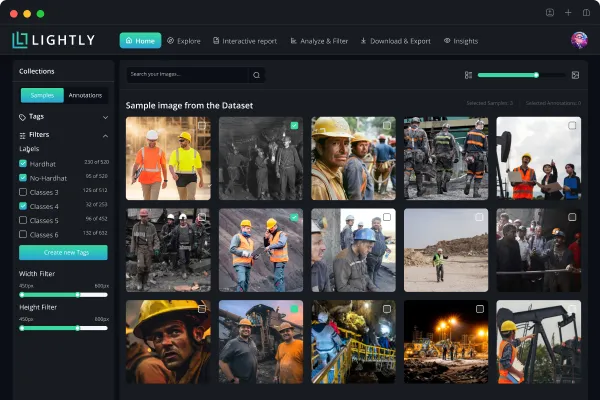
Lightly vs. SuperAnnotate: An Overview
Before we dive into the detailed comparison, let’s review the profiles of each tool and its role in a computer vision workflow.
What is Lightly?
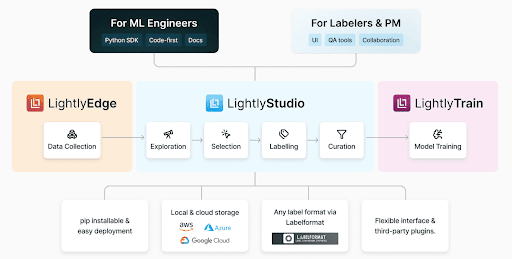
Lightly is a data-centric AI platform that optimizes computer vision workflows through intelligent data curation, self-supervised learning, and automated model training.
It helps ML teams build better vision systems through integrated components that work together in the machine learning pipeline. Including.
- LightlyStudio: It is an enterprise-grade, open-source data curation, annotation platform and dataset management. LightlyStudio unifies curation, labeling, quality assurance, and dataset management in one interface, all locally (on-premise).
- LightlyTrain: A self-supervised training framework that pretrains models on unlabeled data to reduce labeling effort and help you develop domain-aware models for better downstream performance.

What is SuperAnnotate?
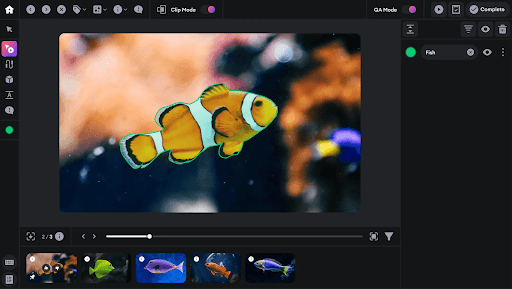
SuperAnnotate is an AI data platform that provides solutions for building, fine-tuning, and managing training datasets across multiple data modalities. Its key product offerings include:
- FineTune: It helps create training data for various data types. SuperAnnotate integrates Meta AI's Segment Anything Model (SAM) for faster polygon generation, as well as scribble- and superpixel-based approaches to reduce inference time for high-resolution images.
- Explore: It provides data management and version control to create accurate datasets efficiently. Explore also includes vector-based similarity search to discover patterns within labeled data and metadata filtering for dataset slicing.
- Orchestrate: A workflow automation engine to build multi-step ML CI/CD pipelines. It integrates with Databricks and AWS Sagemaker for workflow automation and active learning to route low-confidence predictions to the annotation platform.
Deep Dive: Comparing Lightly and SuperAnnotate Feature by Feature
We now have an understanding of each tool. Let's compare them across key dimensions and see how they meet the needs of CV projects.
Data Exploration and Curation
Lightly
Lightly’s embedding-based curation uses self-supervised representations to map unlabeled datasets in high-dimensional space.
You can identify redundant, biased, or low-value samples and automatically select the most informative subsets for labeling in LightlyStudio.
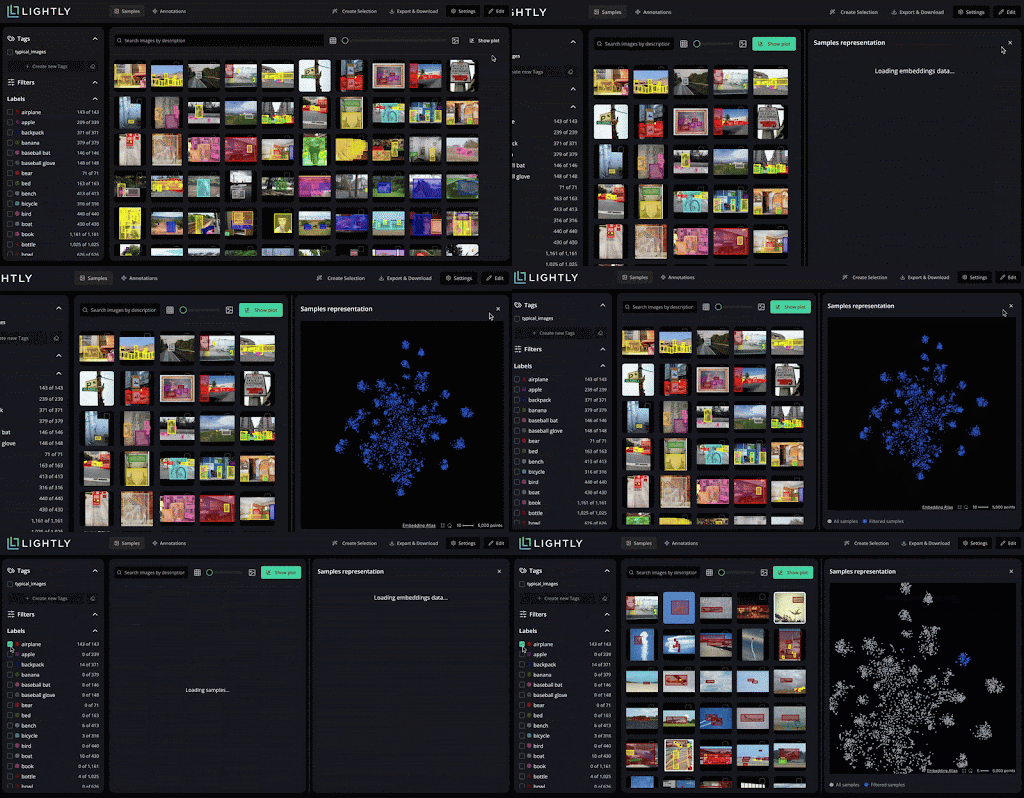
LightlyStudio clusters similar images and applies diversification sampling to ensure labeled subsets cover the dataset’s variability.
Put simply, lightly provide a data-centric workflow where models learn from the right data rather than more data.
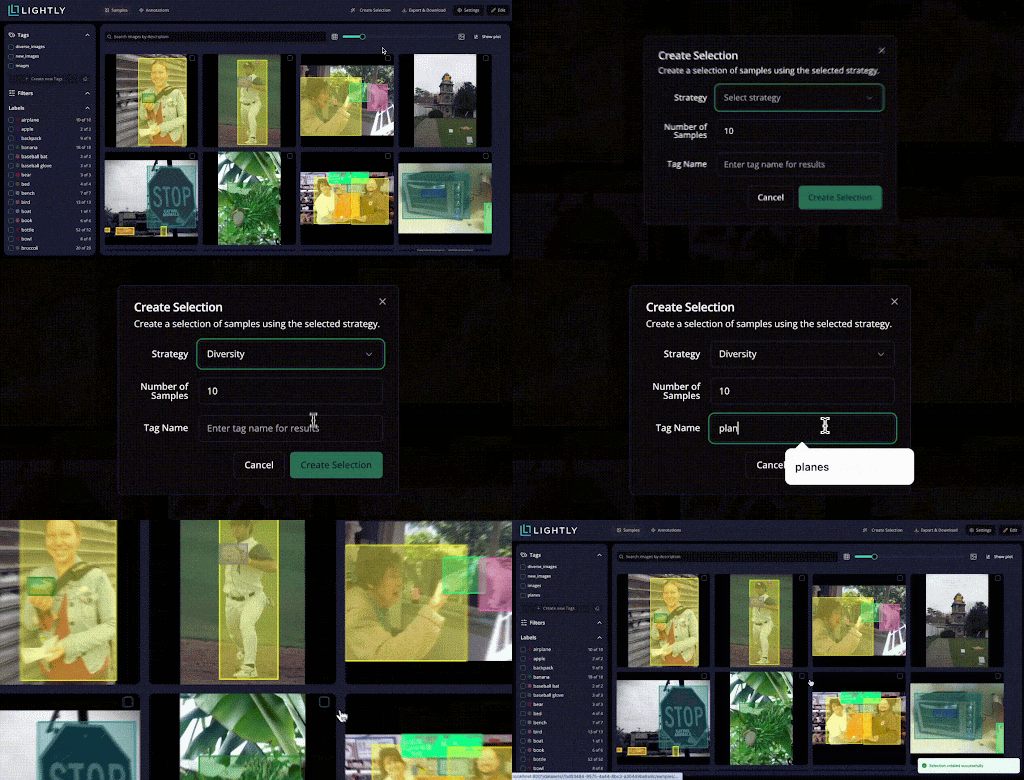
Also, Studio lets you explore data using natural language.
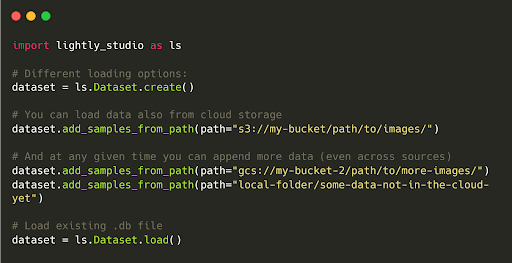
You can connect LightlyStudio to a data source in cloud storage, such as an S3 bucket with millions of images, or to a local system.
SuperAnnotate
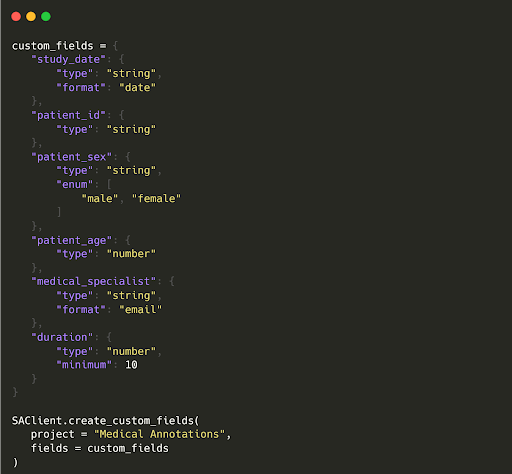
SuperAnnotate Explore provides visual exploration of datasets through vector-based similarity search and metadata filters.
While effective for quick discovery within labeled data, it lacks native embedding generation and self-supervised feature extraction.
You must rely on external models for representation learning, which limits how deeply data quality can be quantified or optimized before labeling.
Annotation Tools and QA
Lightly
LightlyStudio handles images and video annotations and QA within its unified interface without resorting to a separate tool.
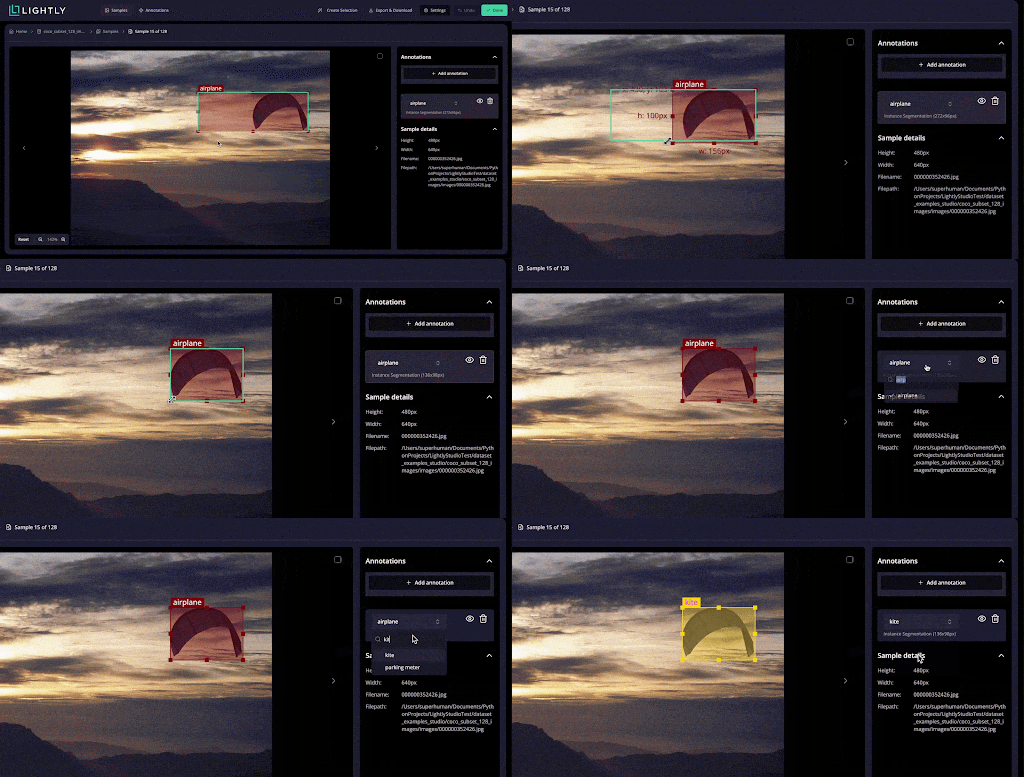
It supports tasks like bounding boxes for object detection, polygons, and segmentation, and can import/export standard formats (COCO, YOLO).

It also includes annotation QA workflows: you can assign tasks, review and correct labels, and add QA tags to samples.
SuperAnnotate
SuperAnnotate also offers QA features and provides an image editor with eight annotation types. Plus, it provides Magic Select (SAM-based segmentation), Magic Box (OCR box), and Magic Polygon for faster annotation.
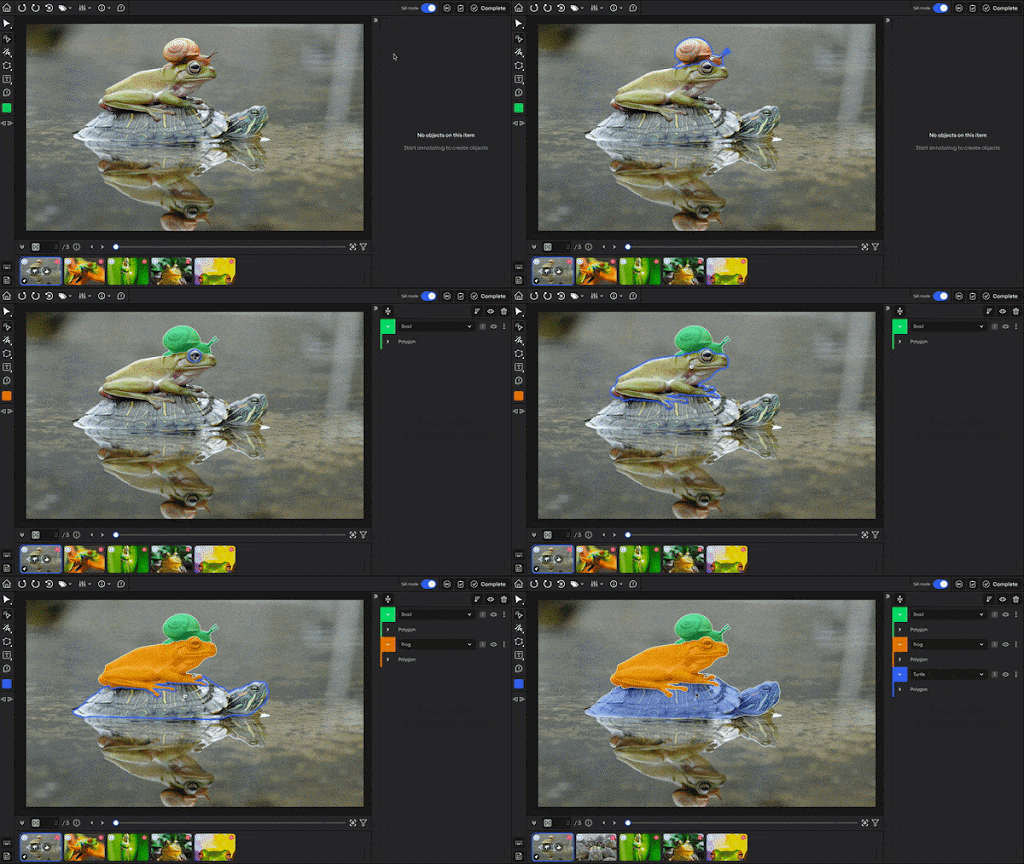
For video, SuperAnnotate has object tracking and interpolation. Its QA system includes built-in annotation stages, review steps, comments, and approve/disapprove controls.
Active Learning and Auto-Labeling
Lightly
Lightly integrates active learning loops directly into its data pipeline to enable sample selection.
It uses multiple active learning data selection strategies, like diversity sampling and metadata thresholding, to identify the most impactful data for model training.
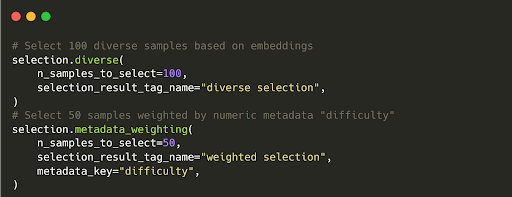
Lightly also allows you to use a trained model’s outputs on unlabeled data to pick uncertain samples for labeling.

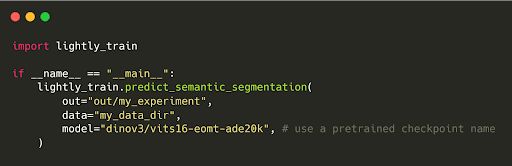
Furthermore, LightlyTrain features an auto-labeling option (currently for semantic segmentation masks, but more coming).
You can pretrain or fine-tune DINOv3 and use its embeddings to auto-label and propagate pseudo-labels on unlabeled images.
These auto-generated labels can then be reviewed manually or used directly for further training of the model.
SuperAnnotate
SuperAnnotate supports AI-assisted annotation via large vision models such as Segment Anything (SAM) and CLIP, as well as imported model predictions. But it does not offer native active learning strategies or foundation model pretraining.
SuperAnnotate is optimized for annotation throughput rather than iterative model-in-loop learning, so you need external scripts to drive active selection cycles.
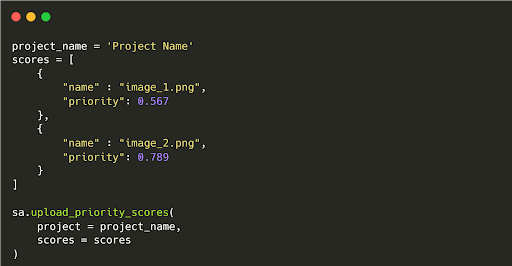
However, it does support priority scores to rank samples by importance, and Annotate Similar to propagate labels among near-duplicate images.
Model Training and Fine-Tuning
Lightly
LightlyTrain provides self-supervised pretraining on your unlabeled images, yielding stronger initial weights and greatly reducing the labels needed for downstream tasks.
In effect, Lightly enables a pretrain-then-finetune workflow with SOTA methods such as SimCLR and DINO for image classification, object detection, semantic, and instance segmentation.
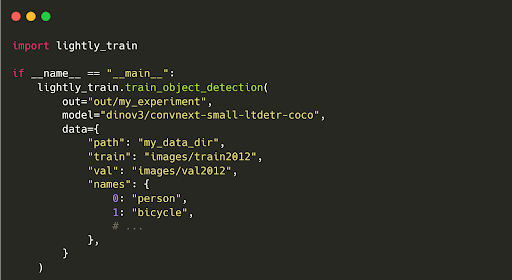
After pretraining, LightlyTrain can fine-tune models on your (limited) labeled data.
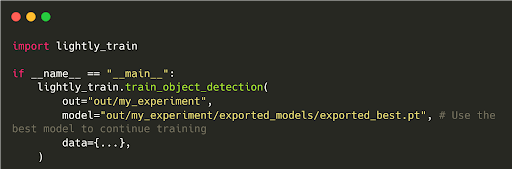
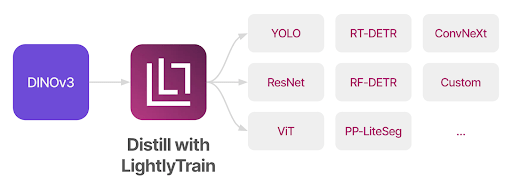
It also supports distillation into smaller architectures like YOLO, ResNet, or RT-DETR for efficient deployment.
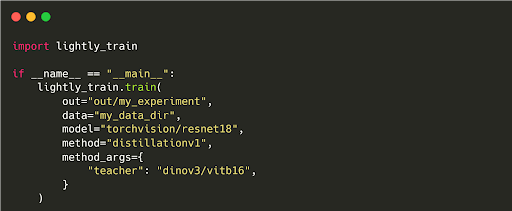
LightlyTrain is compatible with any vision architecture and scales to millions of images.
SuperAnnotate
SuperAnnotate does not provide a built-in training workflow like LightlyTrain. Instead, it integrates with external ML pipelines (Databricks, SageMaker) through APIs or Orchestrate workflows.
SuperAnnotate does include evaluation tools and integrates with MLOps pipelines to monitor model performance.
It also enables automation for annotation feedback loops, but any actual training or fine-tuning would be done outside the platform.
Integration and Automation
Lightly
Lightly API-first architecture allows easy integration with modern ML tooling, including MLFlow, W&B, TensorBoard, and Kubeflow.
Its Python SDK is fully typed (Pydantic schemas), pip-installable, and provides more control and customization options.
You can script dataset creation, sampling queries, automate retraining triggers, schedule data-selection jobs, and even deploy LightlyEdge to stream embeddings from edge devices.
Lightly also provides Docker images for easy setup and can run on-prem or in the cloud.
For security, it offers strong access controls and is suitable for environments with strict privacy or regulatory requirements since it doesn’t rely on cloud services unnecessarily.
SuperAnnotate
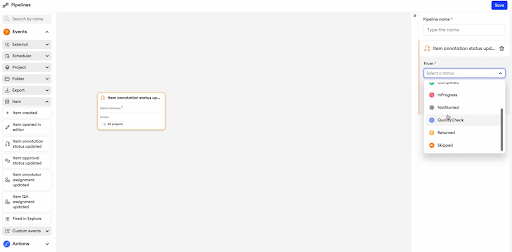
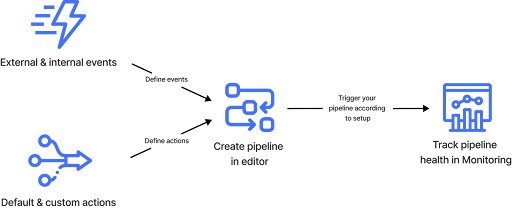
The SuperAnnotate Orchestrate module focuses on workflow automation for annotation projects.
It allows teams to define triggers for project completion, QA events, and run scripts or webhooks that connect to third-party tools like Snowflake or Databricks.
Automation is centred around managing human workflows rather than connecting directly to the ML training loop.
💡 Pro Tip: To decide which data platform best supports intelligent sample selection and dataset refinement, read Best Data Curation Tools for recommended tools and workflow patterns that integrate with your existing CV stack.
Core Feature Comparison Table: Lightly vs. SuperAnnotate
For a quick overview, here’s a high-level comparison of Lightly vs. SuperAnnotate across the features discussed:
Practical Use Cases and Deployment Scenarios
Both Lightly and SuperAnnotate are used by teams across various industries, but their feature focuses can make one more suitable than the other, depending on the scenario.
Here is the highlight of a real-world use case that gives you a quick outlook on business outcomes.
Healthcare Imaging
Lightly and SuperAnnotate bring distinct value based on a project's needs and compliance requirements in medical imaging.
- Lightly: It is ideal for minimizing labels in computer vision through smart selection. Its fully on-premise deployment option secures patient data, and its embedding analysis helps find rare pathologies or outliers to maximize model performance while reducing expensive radiologist labeling time.
- SuperAnnotate: Ideal when a considerable labeling effort is unavoidable. It offers on-premise deployment, superior fine-grained annotation tools, and Multi-layer QA for regulatory compliance.
Manufacturing and Quality Control
In manufacturing, Lightly's active learning approach helps models detect defects with minimal labeled data.
For example, the Lythium salmon team used Lightly to perform active learning at scale and select the most diverse images when facing thousands of new images each day.
This helps them achieve 36% model defect detection accuracy, while recall improves by 32%. And surprisingly, manual inspection time from experts is reduced by 75%.
On the other hand, SuperAnnotate provides tools for detailed annotation of product defects, automated workflows, and integration with manufacturing execution systems.
Business Outcomes (ROI)
Lightly quantifies ROI primarily in reduced labeling costs and improved model performance per label.
It reduces labeling effort (up to 90%) and delivers measurable mAP gains by focusing on data quality. This leads to cost savings and faster, more efficient model improvement.
In contrast, SuperAnnotate quantifies ROI in terms of throughput and time saved in the annotation cycle. It reduces the annotation cycle time and achieves 2× faster time to model, 3× faster annotation time.
Put simply, choose Lightly for ROI if your goal is to minimize outsourcing and label count while maximizing value from a small labeling budget. Plus, you want a train vision model without switching the platforms.
And choose SuperAnnotate for ROI if your goal is to scale annotation throughput rapidly while maintaining project control.
Final Thoughts
Choosing between Lightly and SuperAnnotate comes down to your priorities in the computer vision workflow. Both embody the principles of data-centric AI to improve model outcomes by improving data quality.
Lightly provides ML engineers with tools to optimize data efficiency and model training in one loop. In contrast, SuperAnnotate orchestrates the data annotation lifecycle with human-in-the-loop at enterprise scale.
You can develop a hybrid strategy using both tools to improve your computer vision pipeline’s productivity, model quality, and ultimately, ROI.

Stay ahead in computer vision
Get exclusive insights, tips, and updates from the Lightly.ai team.

.png)
.png)